안녕하세요 상훈입니다.


✔ 에러 환경 / 내용

FrontEnd(Javascript, Vue.js) → BackEnd(Java)
비동기 통신 axios, post 방식으로 전송하였는데, 아래와 같은 에러가 발생하였습니다.

.w.s.m.s.DefaultHandlerExceptionResolver : Resolved [org.springframework.web.HttpMediaTypeNotSupportedException: Content type 'application/x-www-form-urlencoded;charset=UTF-8' not supported]

에러문구

경고이긴하지만, 데이터가 안들어왔으니 결함이 되겠지요?


✔ 이유

- application/x-www-form-urlencoded
- charset=UTF-8

컨트롤러(Controller) - 어노테이션 @RequestBody 에서 인식하지 못하기 때문입니다.

이전
parameter 부분의 @RequestBody를 삭제


✔ 결과

그래서 간단하게 RequestBody 어노테이션을 삭제해주었더니 정상적으로 데이터가 받아졌습니다.

결과 데이터


이상입니다.

감사합니다.


Content type 'application/x-www-form-urlencoded;charset=UTF-8' not supported for @RequestBody MultiValueMap

Based on the answer for problem with x-www-form-urlencoded with Spring @Controller I have written the below @Controller method @RequestMapping(value = "/{email}/authenticate", method = RequestMe...

stackoverflow.com


반응형

안녕하세요 상훈입니다.

Vue3 + Spring 를 비동기 통신 axios 로 서버의 데이터 불러오기를 하려고합니다. 

2가지 이슈가 있었습니다.

1) Spring에서 사용하는 Post 방식.
2) Axios 통신에서 생기는 자체적인 문제

해당하는 부분에 적용해서 봐주시면 될 것 같습니다.


😱 1번째 이슈 😱 

- GET방식만 사용하다 보니, POST 방식을 똑같이 적용하는데에 오류가 발생하였다.

그래서 AXIOS를 사용하여 데이터를 백에서 받을 때 자체가 정상적으로 이루어지지 않았다.

@RestController
@RequestMapping("/rp")
public class RPController {
	@Autowired
	RPService rpService;
    
	@ResponseBody
	@PostMapping("/getItems")
	public List<SearchListOut> searchLists (@RequestBody SearchListIn searchListIn) {
		return rpService.searchLists(searchListIn.getRSeq());
	}
}

 - RestController 를 설정, ReqeustMapping을 통하여 "/rp"에 대한 모든 경로를 받을 것을 선언.

- Service를 연결.

- ResponseBody, PostMapping 을 통하여 post 통신방식으로 데이터를 받을 것을 선언.

- @RequestBody SearchListIn searchListIn 
   ㄴ searchListIn.java  DTO 에서 선언한 내용을 값으로 받겠다고 선언

- searchListIn.getRSeq() 를 통해 해당 값을 전달.


✔ SearchListIn  DTO

// SearchListIn DTO
import lombok.Data;

@Data
public class SearchListIn {
	private int rSeq;
}

이렇게 처리하여서 값을 받아왔습니다!

Spring terminal 에 sysout 된것을 확인.


😱 2번째 이슈 😱 

알고보니 axios에서 2번째 파라미터로 값을 보내게 되는데, 이 부분에서 제대로 적용이 안된다는 이슈가 있었습니다.

그래서 3번째 파라미터로 전달하도록 처리했습니다.

function _fetchRP (url, payload) {
	return new Promise ((resolve, reject) => {
		axios.post(url, null, {params: {...payload} })
		...
	}
}

axios parameter 전달

3번째 인자는 원래 config 옵션인데, 이상하게 그렇게 오류가 뜬다고 알려져 있더라구요.

후일 2번째 파라미터로 정상 동작하게 된다면 현재 옵션이 오류가 발생할 것으로 보입니다.

유념해주세요!

반응형

사용환경 : Linux, Ubuntu, Vue.js 3, vue-cli, axios - post, php

Vue-cli port : 8081
PHP Apache server port : 8080

Vue.js 3 에서 axios를 이용해 php데이터를 송신하는 방법을 포스팅하도록 하겠습니다.

3일째 이거 만지다가 어쩌다 됐습니다. 억울..

[버전은 상관없지만] @vue/cli 4.5.15 에서 적용하였습니다. 


■ 1. Vue-cli project 설정 1/2

/src/views/Account/AxiosTest.vue

디렉터리 구조

제가 form을 이용해 post data송신Vue 페이지는 위와 같습니다.

AxiosTest.vue 
=> input 태그 2개로, id 와 password를 전달하려고 합니다.

1. Template

<template>
  <div>
    <form action="" @submit="checkForm">
      <input type="text" name="id" v-model="idValue" />
      <input type="password" name="password" v-model="passwordValue" />
      <button type="submit">submit</button>
    </form>
  </div>
</template>


2. script

<script>
import axios from "axios";

export default {
  data() {
    return {
      idValue: "",
      passwordValue: "",
    };
  },
  methods: {
    async checkForm(e) {
      e.preventDefault();
      let idValue = this.idValue;
      let passwordValue = this.passwordValue;

      await axios
        .post("/api/loginCheck", {
          id: idValue,
          password: passwordValue
        })
        .then(function (response) {
          // handle success
          console.log("success");

          console.log(response);
        })
        .catch(function (error) {
          // handle error
          console.log(error);
        })
        .then(function () {
          // always executed
        });
    },
  },
};
</script>


■ 1. Vue-cli project 설정 2/2

vue.config.js

vue.config.js

프로젝트의 root 경로에 vue.config.js 파일을 없으신 분들은 생성해주시고 아래의 내용을 복붙해주세요.


vue.config.js

module.exports = {
  devServer: {
    proxy: {
      "/api": {
        target: "http://localhost:8080/",
      },
    },
  },
};


■ 3. php 

Apache 서버를 사용하신다면, 8080포트로 구동 중이실겁니다. (본인의 포트에 맞게 설정해주세요)

/var/www/html/ 경로에 /api 폴더를 생성해주세요. 이곳에 axiosdata 를 수신할 php 파일을 생성할겁니다.

이렇게 생성하였습니다. (자유롭게 생성해주세요. 보통 /api 라고 많이 생성합니다.

/api/loginCheck.php

<?php
 // header의 요청을 수락하는 php 설정들. 안해주면 데이터를 못받는 경우가 생김
header('Access-Control-Allow-Origin:*');
header("Access-Control-Allow-Credentials", "true");
header('Access-Control-Allow-Headers", "Access-Control-Allow-Headers, Origin,Accept, X-Requested-With, Content-Type, Access-Control-Request-Method, Access-Control-Request-Headers');
header('Access-Control-Allow-Methods:GET,POST,PUT,DELETE,OPTIONS');

$data = json_decode(file_get_contents('php://input'), true);

// 반복문으로 데이터 출력 


■ 결과

개발자 - 네트워크
data
콘솔 화면


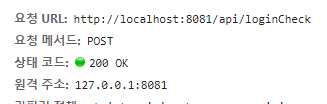
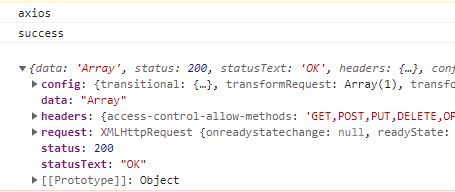
감격스럽게도 200 통신 성공 결과가 출력되었고,

php에서 $data 는 array 의 타입이기 때문에 출력 결과(response) 가 array 로 출력되었습니다. 


■ 1차 수정

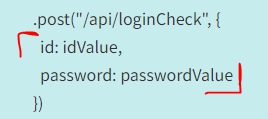
- 기존에 params 를 넘겨줘서 자꾸 데이터가 array로 출력이 되었습니다.

params를 없앤 모습

- 기존 : data(=params객체) : jsonStyleValues 
- 변경 : { jsonStyleValues list}

* POST method에서는 params넘겨주면 안된다. 


참고


Sending Axios parameters with a POST request in PHP – ZeroWP

Using a library like Axios to create complex AJAX requests is simple and easy. Of course, we can use `fetch` but still, I prefer Axios because of the many options it has, which is lightweight, well documented, and stable. Recently I tried to use it by crea

zerowp.com


Configuration Reference | Vue CLI

Configuration Reference Global CLI Config Some global configurations for @vue/cli, such as your preferred package manager and your locally saved presets, are stored in a JSON file named .vuerc in your home directory. You can edit this file directly with yo

cli.vuejs.org

https://coderedirect.com/questions/43570/axios-get-from-local-php-just-returns-code-instead-of-executing


Axios GET from local PHP just returns code instead of executing - Code Redirect

The API I am trying to access has disabled CORS so I need to request on the server side. Utilizing React and Axios I am making a get request to the local php file which should execute cURL but am j...

coderedirect.com


덕분에 3일동안 axioshttp, proxy, 등에 대해 많이 공부할 수 있었습니다.

반응형

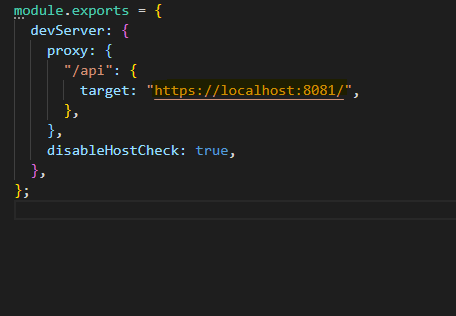
Linux, Ubuntu, Vue-cli, axios를 사용하는데, proxy 에러가 출력되었다.

Proxy error: Could not proxy request 


■ 해결 방법

해당 에러는 root 경로vue.config.js 에서 proxy 관련 정보를 수정하면 된다.

/vue.config.js

module.exports = {
  devServer: {
    proxy: {
      "/api": {
        target: "https://localhost:8081/",
      },
    },
}


기본 경로(/root)가 될 port 번호정보를 작성하면 된다.


이제는 path 문제가 남았습니다.....


proxy 문제가 해결된것을 확인하실 수 있습니다.

이렇게 axios를 이용해서 데이터를 올바른 경로에서 뽑아오면 되겠습니다.


Form Handling | Cracking Vue.js

Form 다루기 폼(Form)은 웹 애플리케이션에서 가장 많이 사용되는 코드 형식입니다. 로그인이나 상품 결제 등 모든 곳에 사용자의 입력을 처리하는 폼이 필요합니다. Form 제작하기 그럼 뷰로 간단

joshua1988.github.io


vue proxy 사용하기

vue cli 3.x 버전 이상에서 웹팩 개발서버를 이용해서 프록시 요청을 보내봅시다.

velog.io


반응형

+ Recent posts