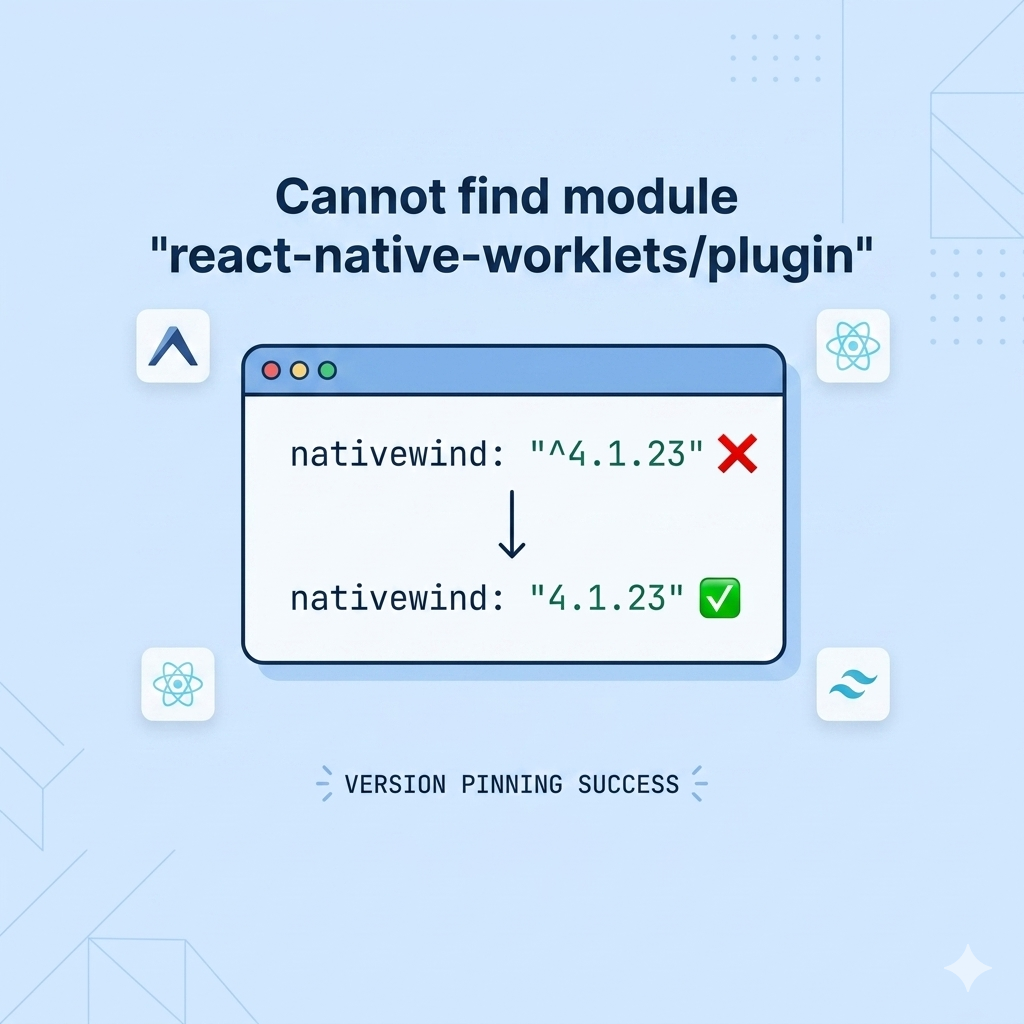
2시간 동안의 사투 끝에 드디어 해결했네요!

Radit 이나 여러 여러 여러 사이트들을 보면 저와 동일한 에러에 직면한 케이스가 많더라구요.

저처럼 Expo SDK 52NativeWind v4 조합으로 앱을 개발하다가 EAS Build에서 막힌 분들을 위해, 그리고 나중에 또 같은 실수를 반복하지 않을 저를 위해 삽질 기록을 정리해 봅니다.

에러사진1
expo build fail image


■ 문제 상황: "분명 로컬에선 됐는데, 빌드만 하면 터진다?"

만보기 기능을 구현하려고 expo-sensors를 달고, 스타일링을 위해 NativeWind v4를 세팅했습니다. 로컬에서는 아주 예쁘게 잘 돌아갔죠. 그런데 eas build 명령어만 날리면 아래와 같은 무시무시한 에러와 함께 빌드가 중단되었습니다.

SyntaxError: index.js: [BABEL] ... Cannot find module 'react-native-worklets/plugin'

분명 react-native-worklets-core를 설치했는데도 바벨(Babel)은 자꾸 이름이 미묘하게 다른 react-native-worklets/plugin이 없다고 징징대는 상황이었습니다.


■ 원인 분석: 범인은 ^ (캐럿) 하나였다

2시간 동안 구글링과 문서 분석 끝에 찾아낸 원인은 NativeWind의 과한 의욕 때문이었습니다.

  1. 버전 자동 업데이트의 함정: package.json에 "nativewind": "^4.1.23"라고 적어두면, npm은 설치 시점에 4.1.23보다 높은 최신 버전(4.2.x)을 가져옵니다.
  2. NativeWind 4.2.x의 변화: 최신 4.2.x 버전은 Reanimated 4에 대응하기 위해 내부적으로 react-native-worklets/plugin을 강제로 호출합니다.
  3. 이름 불일치: 하지만 현재 Expo SDK 52의 표준은 react-native-worklets-core입니다. 바벨은 -core가 붙지 않은 정확한 이름을 찾으려다 보니 모듈을 찾지 못하고 뻗어버린 것이죠.


해결 방법: 버전을 강제로 묶어라 (Pinning)

결국 해결책은 똑똑한 척하는 업데이트 기능을 끄고, 우리 프로젝트와 가장 잘 맞는 안정적인 버전으로 강제 고정하는 것이었습니다.


1. package.json 수정

버전 앞의 ^ 기호를 제거하여 딱 4.1.23 버전만 쓰도록 못 박았습니다.

"dependencies": {
  "nativewind": "4.1.23",  // ^ 제거!
  "react-native-css-interop": "0.2.3",
  "react-native-reanimated": "~3.16.1"
}

2. 찌꺼기 제거 및 재설치

이전 버전의 캐시가 남지 않도록 과감하게 밀고 다시 깔았습니다.

rm -rf node_modules package-lock.json
npm install

3. babel.config.js 정리

불필요한 플러그인 호출을 제거하고 NativeWind v4 전용 설정을 적용했습니다.

module.exports = function (api) {
  api.cache(true);
  return {
    presets: [
      ["babel-preset-expo", { jsxImportSource: "nativewind" }],
      "nativewind/babel",
    ],
    plugins: ["react-native-reanimated/plugin"],
  };
};

▶️ 최신이 항상 정답은 아니다

이번 삽질을 통해 다시 한번 깨달았습니다. 라이브러리 간의 의존성이 복잡하게 얽힌 리액트 네이티브 환경에서는 캐럿(^) 하나가 전체 빌드를 무너뜨릴 수 있다는 것을요.

특히 NativeWind처럼 과도기에 있는 라이브러리는 안정적인 버전을 확인하고 강제로 고정해서 쓰는 습관이 정신 건강에 이로운 것 같습니다. 이제 만보기 데이터가 올라가는 걸 보니 속이 다 시원하네요!

저와 같은 에러로 고통받는 분들이 계신다면, 지금 당장 package.json에서 ^부터 지워보세요.


Expo 에서 build fail 한 내용입니다.

Starting Metro Bundler
Android Bundling failed 735ms index.js (1 module)
SyntaxError: index.js: [BABEL] /home/expo/workingdir/build/index.js: Cannot find module 'react-native-worklets/plugin'
Require stack:
- /home/expo/workingdir/build/node_modules/@babel/core/lib/config/files/plugins.js
- /home/expo/workingdir/build/node_modules/@babel/core/lib/config/files/index.js
- /home/expo/workingdir/build/node_modules/@babel/core/lib/index.js
- /home/expo/workingdir/build/node_modules/metro-transform-worker/src/index.js
- /home/expo/workingdir/build/node_modules/react-native-css-interop/dist/metro/transformer.js
- /home/expo/workingdir/build/node_modules/metro/src/DeltaBundler/Worker.flow.js
- /home/expo/workingdir/build/node_modules/metro/src/DeltaBundler/Worker.js
- /home/expo/workingdir/build/node_modules/jest-worker/build/workers/processChild.js

Make sure that all the Babel plugins and presets you are using
are defined as dependencies or devDependencies in your package.json
file. It's possible that the missing plugin is loaded by a preset
you are using that forgot to add the plugin to its dependencies: you
can workaround this problem by explicitly adding the missing package
to your top-level package.json.

Error: [BABEL] /home/expo/workingdir/build/index.js: Cannot find module 'react-native-worklets/plugin'
Require stack:
- /home/expo/workingdir/build/node_modules/@babel/core/lib/config/files/plugins.js
- /home/expo/workingdir/build/node_modules/@babel/core/lib/config/files/index.js
- /home/expo/workingdir/build/node_modules/@babel/core/lib/index.js
- /home/expo/workingdir/build/node_modules/metro-transform-worker/src/index.js
- /home/expo/workingdir/build/node_modules/react-native-css-interop/dist/metro/transformer.js
- /home/expo/workingdir/build/node_modules/metro/src/DeltaBundler/Worker.flow.js
- /home/expo/workingdir/build/node_modules/metro/src/DeltaBundler/Worker.js
- /home/expo/workingdir/build/node_modules/jest-worker/build/workers/processChild.js

Make sure that all the Babel plugins and presets you are using
are defined as dependencies or devDependencies in your package.json
file. It's possible that the missing plugin is loaded by a preset
you are using that forgot to add the plugin to its dependencies: you
can workaround this problem by explicitly adding the missing package
to your top-level package.json.

    at Module._resolveFilename (node:internal/modules/cjs/loader:1212:15)
    at resolve (node:internal/modules/helpers:193:19)
    at tryRequireResolve (/home/expo/workingdir/build/node_modules/@babel/core/lib/config/files/plugins.js:128:11)
    at resolveStandardizedNameForRequire (/home/expo/workingdir/build/node_modules/@babel/core/lib/config/files/plugins.js:162:19)
    at resolveStandardizedName (/home/expo/workingdir/build/node_modules/@babel/core/lib/config/files/plugins.js:183:12)
    at loadPlugin (/home/expo/workingdir/build/node_modules/@babel/core/lib/config/files/plugins.js:56:7)
    at loadPlugin.next (<anonymous>)
    at createDescriptor (/home/expo/workingdir/build/node_modules/@babel/core/lib/config/config-descriptors.js:140:16)
    at createDescriptor.next (<anonymous>)
    at evaluateSync (/home/expo/workingdir/build/node_modules/gensync/index.js:251:28)
    at /home/expo/workingdir/build/node_modules/gensync/index.js:31:34
    at Array.map (<anonymous>)
    at Function.sync (/home/expo/workingdir/build/node_modules/gensync/index.js:31:22)
    at Function.all (/home/expo/workingdir/build/node_modules/gensync/index.js:210:24)
    at Generator.next (<anonymous>)
    at createDescriptors (/home/expo/workingdir/build/node_modules/@babel/core/lib/config/config-descriptors.js:102:41)
    at createDescriptors.next (<anonymous>)
    at createPluginDescriptors (/home/expo/workingdir/build/node_modules/@babel/core/lib/config/config-descriptors.js:99:17)
    at createPluginDescriptors.next (<anonymous>)
    at /home/expo/workingdir/build/node_modules/@babel/core/lib/gensync-utils/functional.js:22:27
    at Generator.next (<anonymous>)
    at mergeChainOpts (/home/expo/workingdir/build/node_modules/@babel/core/lib/config/config-chain.js:349:34)
    at mergeChainOpts.next (<anonymous>)
    at chainWalker (/home/expo/workingdir/build/node_modules/@babel/core/lib/config/config-chain.js:316:14)
    at chainWalker.next (<anonymous>)
    at buildPresetChain (/home/expo/workingdir/build/node_modules/@babel/core/lib/config/config-chain.js:33:24)
    at buildPresetChain.next (<anonymous>)
    at loadPresetDescriptor (/home/expo/workingdir/build/node_modules/@babel/core/lib/config/full.js:295:53)
    at loadPresetDescriptor.next (<anonymous>)
    at recursePresetDescriptors (/home/expo/workingdir/build/node_modules/@babel/core/lib/config/full.js:77:31)
    at recursePresetDescriptors.next (<anonymous>)
    at /home/expo/workingdir/build/node_modules/@babel/core/lib/config/full.js:156:21
    at Generator.next (<anonymous>)
    at loadFullConfig (/home/expo/workingdir/build/node_modules/@babel/core/lib/config/full.js:113:5)
    at loadFullConfig.next (<anonymous>)
    at transform (/home/expo/workingdir/build/node_modules/@babel/core/lib/transform.js:20:44)
    at transform.next (<anonymous>)
    at evaluateSync (/home/expo/workingdir/build/node_modules/gensync/index.js:251:28)
    at sync (/home/expo/workingdir/build/node_modules/gensync/index.js:89:14)
    at stopHiding - secret - don't use this - v1 (/home/expo/workingdir/build/node_modules/@babel/core/lib/errors/rewrite-stack-trace.js:47:12)
    at Object.transformSync (/home/expo/workingdir/build/node_modules/@babel/core/lib/transform.js:40:76)
    at parseWithBabel (/home/expo/workingdir/build/node_modules/@expo/metro-config/build/transformSync.js:65:18)
    at transformSync (/home/expo/workingdir/build/node_modules/@expo/metro-config/build/transformSync.js:54:12)
    at Object.transform (/home/expo/workingdir/build/node_modules/@expo/metro-config/build/babel-transformer.js:115:58)
    at transformJSWithBabel (/home/expo/workingdir/build/node_modules/@expo/metro-config/build/transform-worker/metro-transform-worker.js:440:47)
    at Object.transform (/home/expo/workingdir/build/node_modules/@expo/metro-config/build/transform-worker/metro-transform-worker.js:549:12)
    at transform (/home/expo/workingdir/build/node_modules/@expo/metro-config/build/transform-worker/transform-worker.js:117:23)
    at Object.transform (/home/expo/workingdir/build/node_modules/react-native-css-interop/dist/metro/transformer.js:15:16)
    at transformFile (/home/expo/workingdir/build/node_modules/metro/src/DeltaBundler/Worker.flow.js:54:36)
반응형


아래와 같이 클래스를 만들었을 경우

1.  Override, 다형성

open class Country ( var fullName: String, var capital: String, var language: String)  {

    fun printFullName () {
        println("fullName: $fullName")
    }
    fun printCapital () {
        println("capital: $capital")
    }
    fun printLanguage () {
        println("language: $language")
    }
    open fun singNationalAnthem () {
        println("singNationalAnthem")
    }
}

class Korea (fullName: String, capital: String, language: String) : Country( fullName, capital, language) {
    override fun singNationalAnthem () {
        super.singNationalAnthem()
        println("sing Korea")
    }
}


class USA ( fullName: String, capital: String, language: String) : Country( fullName, capital, language) {
    override fun singNationalAnthem () {
        super.singNationalAnthem()
        println("sing USA")
    }
}


  1. Country 라는 클래스를 Korea, USA 라는 클래스에서 상속.
  2. 자식 클래스에서는 super.METHOD 를 통해 부모 클래스의 메서드를 호출 할 수 있다.
  3. +커스터마이징이 가능하다 (== 다형성)


fun main (args: Array<String>) {
    val korea = Korea("대한민국", "서울", "한국어")
    korea.singNationalAnthem()
    val usa = USA("미국", "워싱턴", "영어")
    usa.singNationalAnthem()
}

/** output
singNationalAnthem
sing Korea
singNationalAnthem
sing USA
*/

이렇게 출력이 된다.

Java의 문법과는 또 달라서 [ Java(public) / Kotlin(open) ] 신기하다.
뭔가 public 공공의 라는 뜻보다는 open 이 더 직관적이기도 하고


2. Abstract. 추상매서드

다음으로 추상메서드에 대해 메모한다.

//추상클래스
abstract class Game {
    //일반메서드
    fun startGame () {
        println("Game Start")
    }

    //추상메서드
    abstract fun printGameName ()
}

class OverWatch: Game() {
    //추상메서드는 하위 클래스에서 반드시 구현해야함
    override fun printGameName() {
        println("This game is OverWatch.")
    }
}

Game이라는 클래스를 만들었다.
Game > 메서드로 printGameName 이라는 메서드를 만들어놓았다.
: 추상메서드는 반드시!!! 오버라이딩 한 메서드에서 만들어야한다.

fun main (args: Array<String>) {
    val overwatch = OverWatch() //새로운 인스턴스 생성

    overwatch.startGame()
    overwatch.printGameName()
}

새로운 인스턴스 overWatch 를 생성.
해당 클래스에 선언된 메서드를 실행하였다.
printGameName 메서드는 추상메서드로 선언(abstract)

예전에는 이게 무슨소린지 전혀 이해를 못했었는데, 다시 보니 또 바로 이해되는게 신기하다.

반응형

코틀린을 사용하는데에 차이점이 존재했다.

1. Array

//Java
String[] javaArray = {"1", "2", "3"};

//Kotlin  : Array<String> 부분은 생략이 가능하다.
val kotlinArray: Array<String> = arrayOf("1", "2", "3");
val kotlinArray arrayOf("1", "2", "3");

문법이 너무 신기하다.


2. 배열의 사용법

//Until 끝 값을 포함하지 않는 범위를 생성 (시작값 ≤ i < 끝값).
for (i in 1 until 10) {
    println(i) // Prints numbers from 1 to 9 (10 is excluded)
}

//DownTo 값을 감소시키며 반복.
for (i in 10 downTo 1) {
    println(i) // Prints numbers from 10 to 1
}

//Step 반복 간격을 설정 (기본값은 1).
for (i in 1..10 step 2) {
    println(i) // Prints 1, 3, 5, 7, 9
}

꽤나 많은 것들이 확장 되는 것 같다.


3. print

여러 가지가 있지만, 그 중에 JavaScript template literal 처럼 사용하는게 너무 신기했다.

//JavaScript
const literalWord = 'value of Literal'
console.log(`literalWord : ${literalWord}`)

//Kotlin
val literalWord: String = "value of Literal"
println("literalWord : $literalWord");

어떤가? 너무 유사해보이지 않은가??


4. when

fun getGrade (examScore: Int): Char {
    return when {
        examScore >= 90 -> 'A'
        examScore >= 80 -> 'B'
        examScore >= 70 -> 'C'
        examScore >= 60 -> 'D'
        else -> 'F'
    }
}
val grade = getGrade(80)
println("grade: $grade") //B

JavaScript 에서 switch case 와 동일해보인다.
문법자체는 더 간결하고 깔끔하며 break; 를 걸어줄 필요가 없어서 편의성이 더 높다.


5. set

//1. mutable set : 가변
val mutableAnimalSet = mutableSetOf("Lion", "Elephant", "Dog", "1", "2", "1")
println("mutableAnimalSet: $mutableAnimalSet")

//2. immutable set : 불변
val animalSet = setOf("Lion", "Elephant", "Dog", "1", "2", "1")
println("animalSet: $animalSet")

신기했던 건 setOf, mutableSetOf 함수를 사용하면, 중복된 내용은 삭제가 된다는 것이었다.

//output
mutableMap: {key1=Lion, key2=Elephant, key3=Dog}


React.js, Next.js 등을 공부하던 와중
회사에서 인턴 직원분이 백엔드 코드를 짜고 제출하는 모습을 봤다
내용도 꽤나 괜찮았다
이에 자극받아 백엔드 쪽 공부의 필요성을 느끼게 되어 Kotlin 코틀린 공부를 시작하게 되었다.


반응형

도움이 되셨다면 광고 한번 클릭해주세요. 블로그 운영에 큰 힘이 됩니다. 감사합니다.

안녕하세요 상훈입니다. 

리액트 네이티브 앱 구동해야지! 하는 순간 난데없이 날벼락을 맞았습니다.

EXPO를 사용하던, react-native-cli 를 사용하던 상관없을 것으로 판단하고 있습니다. 

ㅎㅎ

Error: adb: failed to install C:\Users\gwi01\.expo\android-apk-cache\Exponent-2.25.2.apk: Failure [INSTALL_FAILED_INSUFFICIENT_STORAGE] › Stopped server

이런 오류가 출력되었는데요, 

오류 내용 이미지

1. 어디에서는 pc를 껐다가 전체적으로 재구동 해봐라~

2. 공식 사이트에서는 SDK 를 재설치 해봐라~ 

등등의 많은 의견들을 보았습니다. 

[ STORAGE ] 라는 부분에 주목하였고,
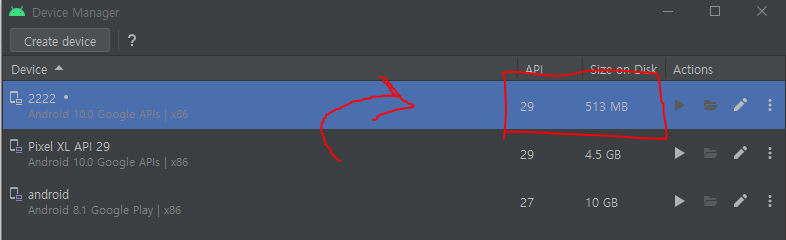
아무래도 AVD 내부의 용량문제가 아닐까? 라는 생각에 바로 새로운 AVD 만들어주었습니다.


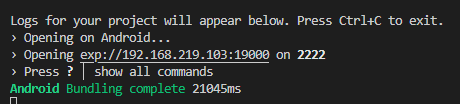
그 후 바로 구동해보니 정상적으로 출력됨을 확인했습니다. 

참고 바랍니다 ㅎㅎ

도움이 되셨다면 광고 한번 클릭해주세요. 블로그 운영에 큰 힘이 됩니다. 감사합니다.

어이가 없네요. 20분은 날린것 같은디.

다행히.. 이렇게 오늘도 살아남았습니다.


내 황금같은 저녁 시간에. ㅠ

고생하십쇼!


도움이 되셨다면 광고 한번 클릭해주세요. 블로그 운영에 큰 힘이 됩니다. 감사합니다.

반응형

'Android' 카테고리의 다른 글

[해결] Cannot find module 'react-native-worklets/plugin' ...  (0) 2026.05.01

안녕하세요 상훈입니다.

Kotlin 에서 button 클릭 시, 혹은 image button 클릭 시,
Toast 메시지를 출력하는 방법에 대해 포스팅 하겠습니다.


var contentToast = Toast.makeText(this, "Content button clicked", Toast.LENGTH_SHORT)
contentToast.show()

toast메시지 생성 방법은 위와 같습니다.
변수에 toast 메시지 내용할당하고, show() 함수를 통해 해당 내용을 체이닝하여 출력하는 방식.


예제1)

버튼 클릭 시, toast 메시지 출력

private lateinit var binding: ActivityMainBinding

onCreate(){

  binding.contentBtn.setOnClickListener {
      var contentToast = Toast.makeText(this, "Content button clicked", Toast.LENGTH_SHORT)
      contentToast.show()
  }
       
}

contentBtn이라는 id 를 가진 Image Button에 대한 클릭 이벤트 안에 Toast 메시지를 출력하도록 작성하였습니다.


예제2) : 좋아요 버튼

이미지 버튼 2개 준비합니다. [ 클릭 전, 클릭 후 ] 의 각각의 이미지를 나타냅니다.

binding.heartBtn.setOnClickListener {
    if (!liked) {
        binding.heartBtn.setBackgroundResource(R.drawable.checkedheart);
        var likeToast = Toast.makeText(this, "Liked!!", Toast.LENGTH_SHORT)
        likeToast.show()
    } else {
        binding.heartBtn.setBackgroundResource(R.drawable.heart);
        var likeToast = Toast.makeText(this, "UnLiked!!", Toast.LENGTH_SHORT)
        likeToast.show()
    }
    liked = !liked; // reverse
}


before  &  after


클릭 시 toast 메시지 출력과 빈 하트가 빨간 하트로 변경되게 설정하였습니다.

vue로 따지자면 v-if( ! liked ) / else 가 되겠네요.

반응형


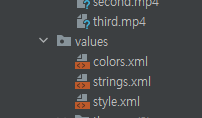
values / style.xml

style.xml 파일을 하나 만들어주세요.

<?xml version="1.0" encoding="utf-8"?>
<resources>

<!-- Base application theme. -->
    <style name="ThemeActionBar"
        parent="Widget.AppCompat.Light.ActionBar.Solid">
        <item name="android:background">@null</item>
        <!-- Support library compatibility -->
        <item name="background">@null</item>
    </style>
</resources>

해당 내용을 작성합니다. 

@null 로 처리하여 없애버립니다(투명하게)


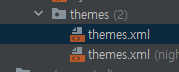
2. themes / themes.xml 

이곳으로 이동해주세요
이 아래에 작성해주세요.


<!-- Customize your theme here --> 아래에 작성해주세요


<!-- actionbar -->
        <item name="android:actionBarStyle">@style/ThemeActionBar</item>
        <item name="android:windowActionBarOverlay">true</item>
        <!-- Support library compatibility -->
        <item name="actionBarStyle">@style/ThemeActionBar</item>
        <item name="windowActionBarOverlay">true</item>


Avd 재구동! ( 에뮬레이터 )


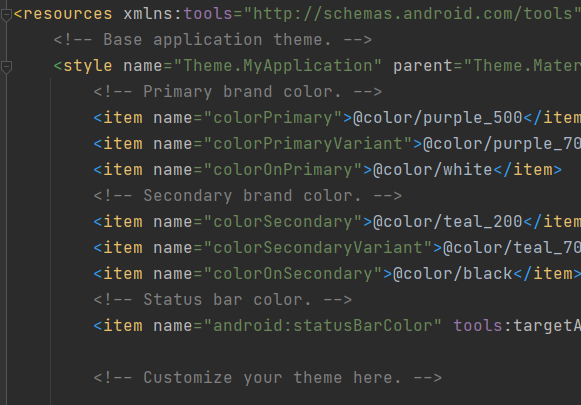
원래는 있던 ActionBar가 사라진 것을 알 수 있습니다.


이전 모습 비교:


[ Kotlin, Java ] 안드로이드 스튜디오 - 비디오 배경화면 설정하기

mainActivity.kt val videoUri = Uri.parse("android.resource://" + packageName + "/" + R.raw.first ); binding.videoView.setVideoURI(videoUri); binding.videoView.start(); binding.videoView.setOnComplet..

code-hoon.tistory.com

감사합니다.


참고


Material Design Transparent ActionBar

I'd like to know if anyone knows how to make an activity with transparent action bar, like the one you have in the new Google Play Store when you go to an app's page. I don't care about the scroll...

stackoverflow.com


How to change the color of Action Bar in an Android App? - GeeksforGeeks

A Computer Science portal for geeks. It contains well written, well thought and well explained computer science and programming articles, quizzes and practice/competitive programming/company interview Questions.

www.geeksforgeeks.org


반응형

mainActivity.kt

val videoUri = Uri.parse("android.resource://" + packageName + "/" + R.raw.first );
        binding.videoView.setVideoURI(videoUri);
        binding.videoView.start();
        binding.videoView.setOnCompletionListener {
            binding.videoView.start();
        }


activity_main.xml

<?xml version="1.0" encoding="utf-8"?>
<RelativeLayout xmlns:android="http://schemas.android.com/apk/res/android"
    xmlns:app="http://schemas.android.com/apk/res-auto"
    xmlns:tools="http://schemas.android.com/tools"
    android:layout_width="match_parent"
    android:layout_height="match_parent"
    tools:context=".MainActivity">
    
    <VideoView
        android:id="@+id/videoView"
        android:layout_width="match_parent"
        android:layout_height="match_parent"
        android:layout_alignParentTop="true"
        android:layout_alignParentBottom="true"

        />
</RelativeLayout>


ConstraintLayout -> RelativeLayout으로 변경.

VideoView를 삽입하고, 해당 내용을 작성한다.


=> VideoView Layout 아래부터 코드를 작성하면 동영상 레이아웃이 가장 하단에 쌓여,

z-index가 가장 낮은 순위가 된다.


포토샵으로 보자면, 동영상 레이아웃을 가장 아래에 놓고 위에 다른 레이아웃들을 쌓는 형태이다.


How to create a video background for my app in Kotlin? setVideoURI and setVideoPath are not working - Stack Overflow


webcache.googleusercontent.com


반응형


java.lang.NullPointerException: Attempt to invoke virtual method 
'android.view.WindowInsetsController com.android.internal.policy.DecorView
.getWindowInsetsController()'on a null object reference


전체화면 적용 중에 

해당되는 에러가 발생하였다.


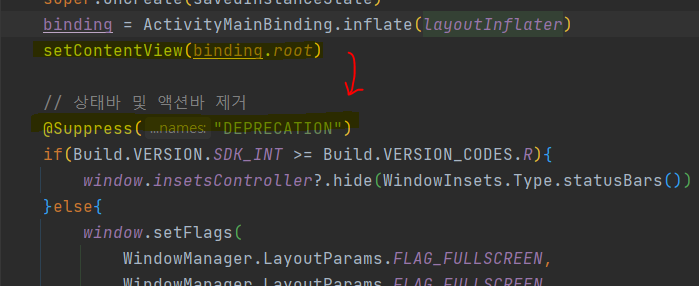
이 이유는 onCreate() 안에서 setContentView가 선언되기 전에 전체화면 적용하는 코드를 작성하였기 때문이다.

이와 같이 setContentView(binding.root)끝난 후에 해당 내용을 작성해주는 것으로 이동시키면 해결.


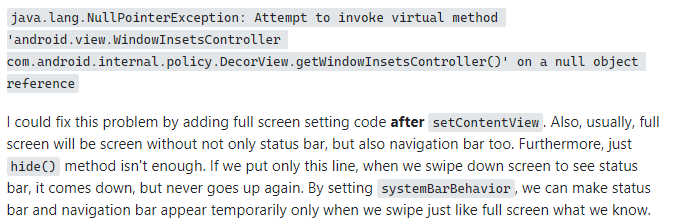
stackoverflow에서 발췌


How to set fullscreen in Android R?

I need to put a screen in fullscreen in my app. For this I am using this code: override fun onCreate(savedInstanceState: Bundle?) { super.onCreate(savedInstanceState) requestWindowFeature(W...

stackoverflow.com


반응형

+ Recent posts