sudo service apache2 start / restart 에러

systemctl status apache2.service
● apache2.service - The Apache HTTP Server
     Loaded: loaded (/lib/systemd/system/apache2.service; enabled; vendor preset: enabled)
     Active: failed (Result: exit-code) since Wed 2021-10-27 14:16:45 KST; 16min ago
       Docs: https://httpd.apache.org/docs/2.4/
    Process: 475439 ExecStart=/usr/sbin/apachectl start (code=exited, status=1/FAILURE)

10월 27 14:16:45 server systemd[1]: Starting The Apache HTTP Server...
10월 27 14:16:45 server apachectl[475447]: apache2: Syntax error on line 231 of /etc/apache2/apache2.conf: Could not open configuration file /etc/phpmyadmin/apache.conf: No such file or directory
10월 27 14:16:45 server apachectl[475439]: Action 'start' failed.
10월 27 14:16:45 server apachectl[475439]: The Apache error log may have more information.
10월 27 14:16:45 server systemd[1]: apache2.service: Control process exited, code=exited, status=1/FAILURE
10월 27 14:16:45 server systemd[1]: apache2.service: Failed with result 'exit-code'.
10월 27 14:16:45 server systemd[1]: Failed to start The Apache HTTP Server.

환경: Linux Ubuntu 20.0.4LTS, PHP8, Apache 사용

사전 작업 : php7.4 -> php 8.0으로 업그레이드 (완료)


이에 해당하는 에러를 어떤 사람이 /etc/apache2/apache2.conf  파일의 수정을 통해 해결했다는 내용이 있었다.
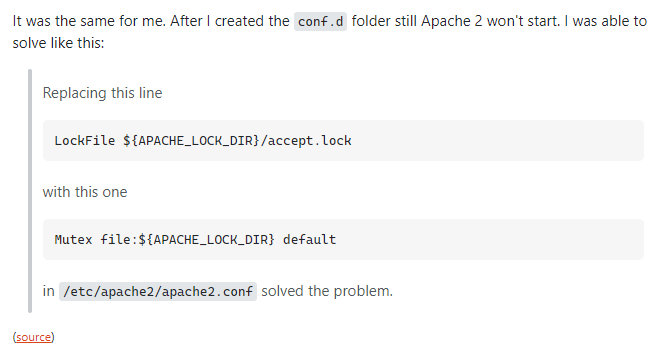
 

이에 맞춰 apache2.conf 를 자세히 보던 와중 에러 문구가 눈에 띄었다.
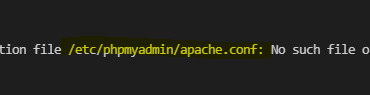
phpmyadmin 부분에서 문제라는 것을 확인하였다. 


그래서 과감하게 (사실은 소심하게 주석까지 해주면서ㅋㅋ)  phpmyadmin을 사용하지 않으니 해당 부분을 주석처리하여 서버(server)를 구동할 때 해당 부분을 읽지 않게 하였더니 성공.

=> 하지만 이것은 phpmyadmin을 사용하시는 분들은 하면 안된다는 것을 확인해주세요.


아무래도 php 버전 업그레이드(7.4->8.0 upgrade)를 하면서
phpmyadmin 고유의 데이터베이스(database)를 놓고,

해당 부분을 추가적으로 손보지 않았기 때문에 이러한 에러가 발생한 것 같았다.


그리고 이제 다시 restart를 해보니 성공.


이상입니다.


apache2 error Could not open configuration file /etc/apache2/conf.d/: No such file or directory

I have just upgraded my Ubuntu 13.10 and apache2 is not working. When I try to start the apache2 server it is printing following errors: * Starting web server apache2 * The apache2 configtest fa...

askubuntu.com


How can I start apache2 from error code=exited status=1 | DigitalOcean

Im a web developer and im new in Ubuntu, I have days trying to install apache2 to work with php. But I always get this error starting Apache2: ``` Job for apache2.service failed because the control process exited with error code. See 'systemctl status

www.digitalocean.com


apache restart 오류 질문입니다

우분투 서버이구요 index죽이기 하려고 했는데 mod_write 가 설치 안되어있는 것같아 구글링해서 설치하던 중  service apache2 restart를 했는데 아래와 같이 나옵니다..   Job for apache2.service f

www.cikorea.net


How to Upgrade from PHP 7.x to PHP 8 on Ubuntu (Apache) - DevAnswers.co

How-to guide on upgrading PHP 7.x to PHP 8 on Ubuntu (Apache). Remove PHP 7.x and Install PHP 8 on Ubuntu (Apache)

devanswers.co

 

반응형
Error:  You are using an unsupported version of Node. Please update to at least Node v12.14
    at assertSupportedNodeVersion

Error:  You are using an unsupported version of Node. Please update to at least Node v12.14 at assertSupportedNodeVersion

그래서 업데이트를 진행하였는데 추가적인 에러가발생하여 node 자체를 지우고 재설치를 하게되었다.


1. node.js 제거 과정 (디렉터리와 bash 내용을 전부 삭제)

sudo rm -rf /usr/local/bin/npm /usr/local/share/man/man1/node* /usr/local/lib/dtrace/node.d ~/.npm ~/.node-gyp /opt/local/bin/node /opt/local/include/node /opt/local/lib/node_modules 

sudo rm -rf /usr/local/lib/node* ; sudo rm -rf /usr/local/include/node* ; sudo rm -rf /usr/local/bin/node*

sudo apt-get purge nodejs npm


2. node.js 설치과정

sudo apt install nodejs

sudo apt install npm

// cache 제거. 안해주시면 에러 발생가능성이 있습니다.
sudo npm cache clean -f 

// 전역에서 사용가능하게 npm을 n이라는 이름으로 다운로드
sudo npm install -g n

// 안정화 버전을 설치
sudo n stable


3. 확인

node -v
v16.13.0

npm -v
8.1.0


자꾸 오류 나고 그래서 삭제만 8번 넘게 진행한 것 같네요.

억울하고 분통터져

원래 뭘 진행하려고 했는지도 머리속에서 증발하게 되었습니다. ㅎㅎ 
다시 무엇을 하려고했는지 떠나요~


참고


[Node] Node.js, NPM 최신버전으로 업그레이드하기

기존 node.js 가 설치 되어 있다고 가정하에 업그레이드를 진행합니다. Node.js Upgrade 1. 현재 Node.js 버전확인 $ node -v 2. cache 삭제 $ sudo npm cache clean -f 3. n 모듈 설치 $ sudo npm install -g n 4..

eomtttttt-develop.tistory.com


npm Error: Cannot find module 'semver'

I get the following error when I try to run npm command root@localhost:# npm --version internal/modules/cjs/loader.js:584 throw err; ^ Error: Cannot find module 'semver'...

superuser.com


Ubuntu – Npm can’t find module “semver” error in Ubuntu 19.04 – iTecTec

I am getting the following error whenever I try to run npm command. internal/modules/cjs/loader.js:626 throw err; ^ Error: Cannot find module 'semver' Require stack: - /usr/share/npm/lib/utils/unsupported.js - /usr/share/npm/bin/npm-cli.js at Function.Modu

itectec.com

기타 등등..

반응형
반응형

안녕하세요 상훈입니다.

해당 에러에 대해 말씀드리겠습니다.

바인드를 하려는 대상에 key설정되지 않았기에 해당 에러가 발생하였습니다.

그러니 :key를 추가하면 됩니다.

예시)

이렇게 button을 data-binding으로 v-for를 사용하려고할 때, key를 정해주지 않아 발생하는 에러입니다.

위처럼 key 값을 정해주면 해결됩니다.


이상입니다.


반응형

안녕하세요 상훈입니다.

Vue.js - Tailwind.css 를 적용하려고 하는데 에러가 발생하였습니다.

This relative module was not found: * ./assets/index.css?vue&type=style&index=0&lang=css in ./src/App.vue
This relative module was not found: * ./routes/index.js in ./src/main.js

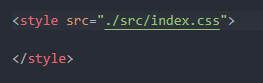
자세히 보니 경로가 잘못되었더군요

그래서 본래 

였던 것을 

로 변경하였습니다.

그리고 다시 

npm run serve를 통해 vue-cli를 실행시켜주니, 에러가 해결되었습니다.


만약 이런 사소한 경로 잡는 문제로 해결이 안된다면, 아래의 해당 블로그를 참조 바랍니다.


vue error 해결법 : This relative module was not found: * ./routes/index.js in ./src/main.js

vue에서 처음 프로젝트를 실행하다보면 아래와 같은 에라가 발생하는 경우가 있다. This relative module was not found: * ./routes/index.js in ./src/main.js 위와 같은 에러는 main.js에서 해당 index.js 파일..

wotres.tistory.com


이상입니다. 감사합니다.

반응형

안녕하세요 상훈입니다.

java.lang.NoClassDefFoundError: org/springframework/beans/factory/config/EmbeddedValueResolver

에러해결에 대해 포스팅하겠습니다.


해당 내용은 pom.xmldependency추가하는 것으로 해결이 가능합니다.

<!-- https://mvnrepository.com/artifact/org.springframework/spring-jdbc -->
<dependency>
    <groupId>org.springframework</groupId>
    <artifactId>spring-jdbc</artifactId>
    <version>5.0.20.RELEASE</version>
</dependency>


dependency에 작성해주시면됩니다. 저장 필수!


↓아래의 maven 글이 안들어가지는 현상이 발생하더라구요... 그냥 위의 코드를 복사하시는 것을 추천드립니다.

https://mvnrepository.com/artifact/org.springframework/spring-jdbc/5.0.20.RELEASE


참고


java.lang.NoClassDefFoundError: org/springframework/beans/factory/config/EmbeddedValueResolver

I've recently managed to upgrade a jhipster generated app (Spring Boot + Angular) Issue comes after cleaning code and adapting a few annotations, now I get success when doing a maven clean - install

stackoverflow.com


반응형

안녕하세요 상훈입니다.

java.lang.ClassNotFoundException: org.springframework.dao.support.PersistenceExceptionTranslator


에러 해결에 대해 포스팅하겠습니다.

내용은 아주 간단합니다. pom.xmlspring-dao dependency가 없다는 것입니다.

바로 추가해보도록하죠 

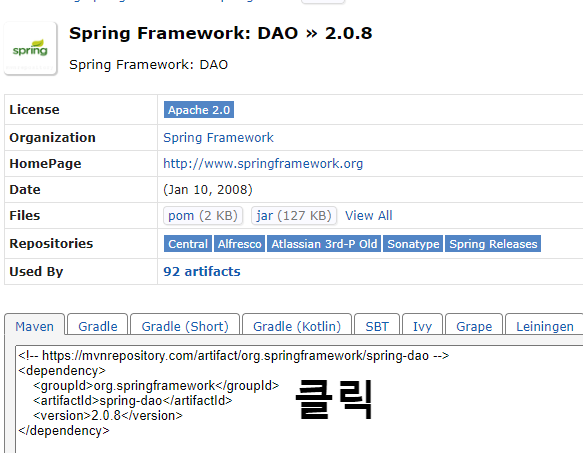
<!-- https://mvnrepository.com/artifact/org.springframework/spring-dao -->
<dependency>
    <groupId>org.springframework</groupId>
    <artifactId>spring-dao</artifactId>
    <version>2.0.8</version>
</dependency>

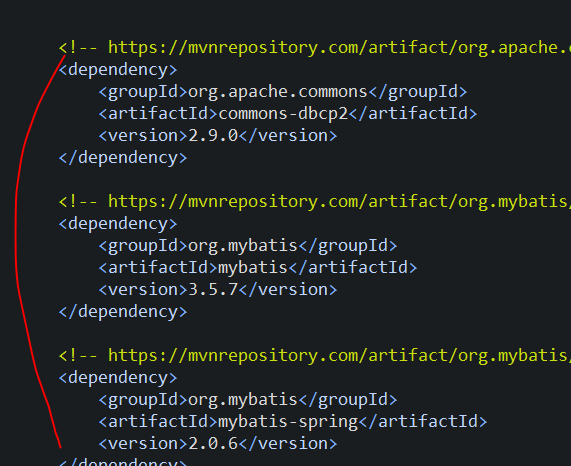
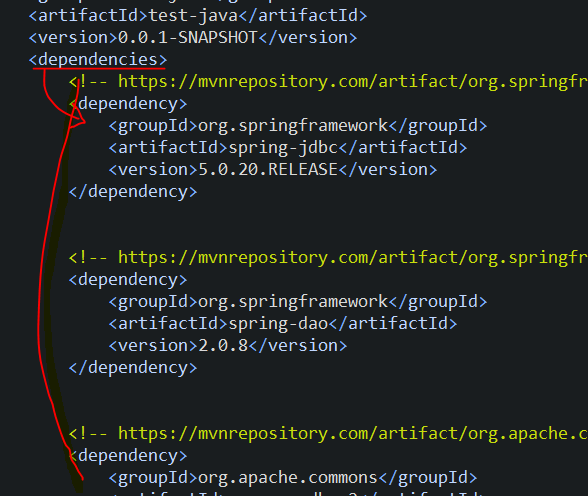
해당 내용을 pom.xml -> dependency 에 작성해주시면 됩니다.


dependencies 내에 작성한다.


마우스 클릭하면 바로 복사가 됩니다. 편리하게 사용하세요!


https://mvnrepository.com/artifact/org.springframework/spring-dao/2.0.8


참고 


java.lang.ClassNotFoundException: org.springframework.dao.support.PersistenceExceptionTranslator

I have created a spring boot web project using a 2.1.8 version of boot from https://start.spring.io/. When I run the project, it throws the error: java.lang.ClassNotFoundException: org.springfram...

stackoverflow.com


반응형

안녕하세요 상훈입니다.

maven 프로젝트 빌드 중에 에러가 발생하였습니다.

Maven error Cannot access defaults field of Properties
Could not initialize class org.apache.maven.plugin.war.util.WebappStructureSerializer


이 두가지의 경우 입니다.


 stackoverflow에 등록된 내용으로 살펴보았을 때


Maven error Cannot access defaults field of Properties

I use the newest version of Java -> 16. When I run mvn clean, I am getting Could not initialize class org.apache.maven.plugin.war.util.WebappStructureSerializer error. I read that adding maven-war-

stackoverflow.com


프로젝트의 pom.xml 의 하단부plugin 이 있는데, 해당 내용을 변경해주시면 됩니다.

<plugin>
    <groupId>org.apache.maven.plugins</groupId>
    <artifactId>maven-war-plugin</artifactId>
    <version>3.3.1</version>
</plugin>
<plugin>
      <groupId>org.apache.maven.plugins</groupId>
      <artifactId>maven-compiler-plugin</artifactId>
      <version>3.8.1</version>
</plugin>


신경써야할 부분은 오직 <artifactId><version> 이니, 다른 추가적인 내용은 무시하셔도됩니다.

artifactId가 일치하는지, version을 최신화 해주었는지 확인해주시면 됩니다.

그리고 저장update(ALT +  F5).
 간혹 1-2분 후에 에러가 없음 문구가 늦게 변경되는 경우도 있으니 참고 바랍니다.


maven dependency 내용

https://mvnrepository.com/search?q=+maven-war-plugin 

https://mvnrepository.com/artifact/org.apache.maven.plugins/maven-compiler-plugin/3.8.1


참고 사이트


Could not initialize class org.apache.maven.plugin.war.util.WebappStructureSerializer

Could not initialize class org.apache.maven.plugin.war.util.WebappStructureSerializer 위와 같은 에러가 나올 때는 아래와 같이 플러그인을 추가해주면 된다.                   maven-war-plugin

jisblee.me


반응형

+ Recent posts