안녕하세요 상훈입니다.
Vue.js에서 Javascript의 onclick addEventListener와 같이 onclick 이벤트를 주는 방법을 설명하겠습니다.
뷰는 매우 간단하더군요.
0. 기본문법
<button v-on:click=""></button>
<button @click=""></button>
v-on:click 이 기본,
그리고 @click이 축약 버전입니다. 입맛에 맞게 사용하시면 됩니다.
1. 익히 알고 있는 함수 호출하기
2. 간단한 연산 결과값 도출
1. 함수 호출하기
<button @click="LetsGoVue"></button>

<script>
export default {
  name: 'App',
  data() {},
  methods: {
  	LetsGoVue() {
    	console.log('hello')
    }
  }

</script>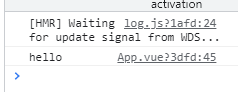
2. 연산 결과값 도출 [ v-if, v-on:click ]
예시) 모달창 팝업
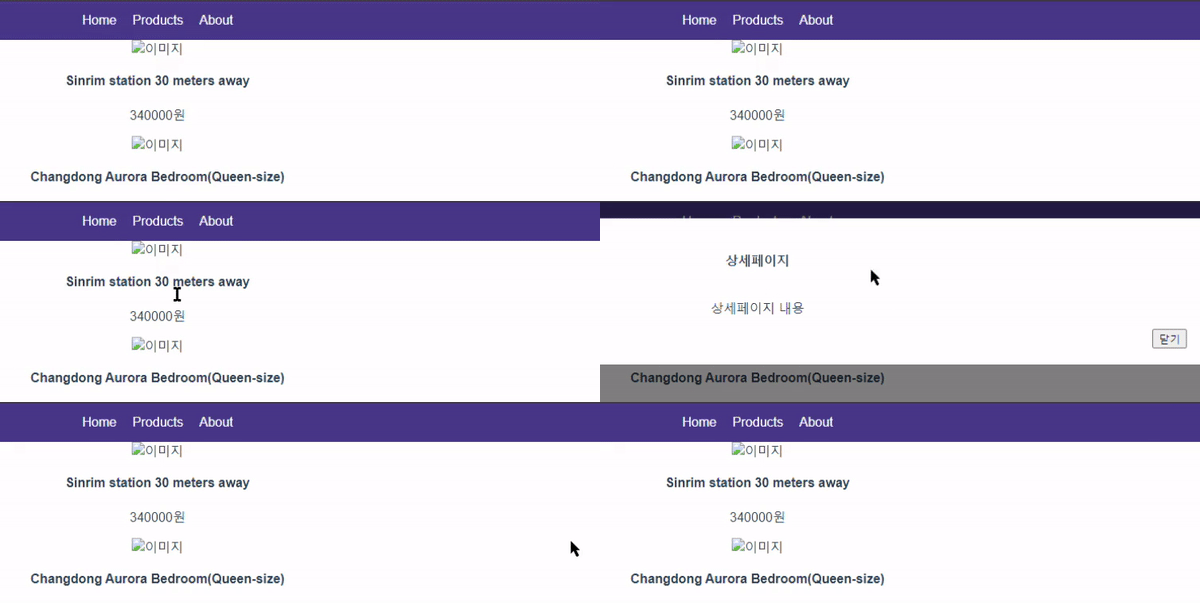
버튼 클릭 시, 모달창이 뜨고 사라지게 하는 내용을 구현하겠습니다.
<div class="black-bg" v-if="modalStatus">
    <div class="white-bg">
      <h4>상세페이지</h4>
      <p>상세페이지 내용</p>
      <button class="modal-close" @click="modalStatus = 0 ">닫기</button>
    </div>
</div>
모달레이아웃 div 부분입니다.
modalStatus라는 변수가 1일 때만 해당 내용이 존재하게 하는 조건문[ v-if ] 으로 구현하였습니다.
button을 클릭시 modalStatus라는 변수에 0을 대입하는 것으로 구현하였습니다.

script 내 data 내에 modalStatus 변수의 기본값을 0으로 설정하여 처음 렌더링 되었을 때, 보이지 않게 설정하였습니다.

반응형
'FrontEnd > Vue.js' 카테고리의 다른 글
| npm run dev 에러 해결 (0) | 2021.09.27 |
|---|---|
| [ ESLint ] 에러 해결 : 1 error and 0 warnings potentially fixable with the `--fix` option. (0) | 2021.09.23 |
| [ Vue.js ] 뷰 프로젝트 생성하는 방법 / How to Create Vue-Project (0) | 2021.09.19 |
| [ Vue.js ] 반복문 사용하기 for .. in .. , 객체 리스트 출력하는 방법 (0) | 2021.09.15 |
| [ Vue.js ] 01. 뷰 설치하기 - vue cli 설치하는 방법 (0) | 2021.09.09 |